The Shoebox Problem
We all know the drill. You buy coffee, shove the receipt in your pocket, and tell yourself you'll log it later. By the end of the week, you've got a crumpled pile of paper slips and zero motivation to type them all into a spreadsheet. Tax season rolls around and suddenly you're digging through drawers like a detective on a cold case.
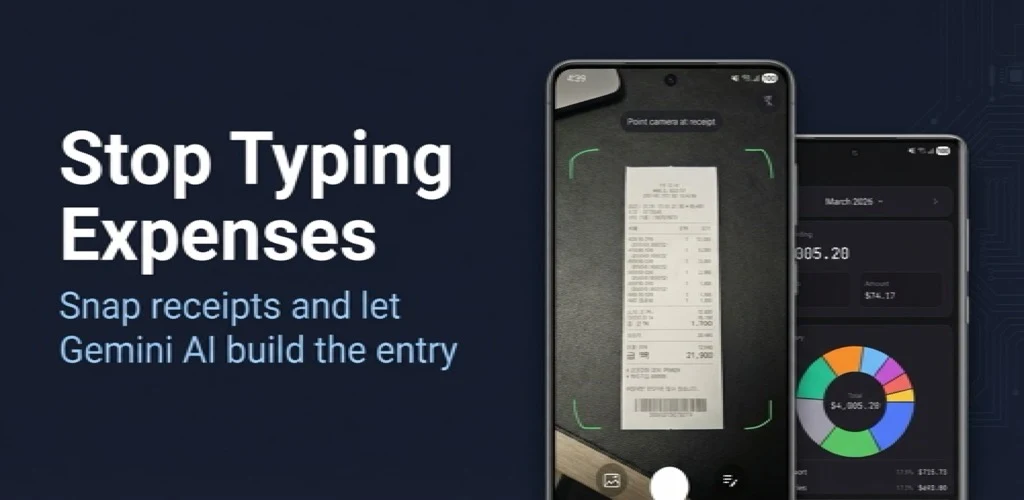
This is the problem AI receipt scanners are designed to solve. Instead of manual data entry, you snap a photo and let the AI figure out the merchant name, date, amount, and category. But how does that actually work? And more importantly — can you trust it?
OCR vs. AI Vision: Two Very Different Approaches
Traditional receipt scanners use OCR (Optical Character Recognition) — essentially pattern matching that converts pixel shapes into text characters. OCR has been around for decades, and it works reasonably well on clean, printed text. The problem is that receipts are anything but clean. Thermal paper fades. Ink smears. Fonts vary wildly between a gas station in Texas and a convenience store in Seoul.
The newer approach uses AI vision models like Google's Gemini. Instead of just recognizing individual characters, these models understand the structure of a receipt. They can identify that "$4.50" next to "Americano" is a line item, that the number at the bottom is the total, and that "03/15/2026" is the date — even if the receipt is crumpled, slightly tilted, or partially faded.
In benchmark tests, Gemini achieves around 94% accuracy on scanned documents — the highest among major AI models for image-based text extraction. For clean, text-based documents, accuracy jumps to 96%. That's a meaningful difference from the 50-60% accuracy some users report with basic OCR-only apps.
Why the Gap Matters
The difference between 60% and 94% accuracy isn't just about convenience — it's about trust. If you have to manually correct every other receipt, the scanner is actually adding work instead of saving it. The whole point is to spend less time on data entry, not more.
What Actually Affects Accuracy
Even the best AI model isn't magic. Here are the real-world factors that determine whether your scan comes out clean:
- Lighting — A well-lit photo makes a huge difference. Shadows across the receipt text can confuse even advanced models.
- Cropping — When the AI has to process your entire kitchen counter to find a small receipt, accuracy drops. Apps that let you crop before analysis — so the AI focuses on just the receipt — consistently produce better results.
- Receipt condition — Thermal paper receipts fade over time. If you wait a month to scan a receipt that's been sitting in your car, expect lower accuracy.
- Language and currency — Multi-language support matters more than you'd think. A receipt from a German supermarket looks very different from one at a Korean convenience store. The AI needs to handle different date formats, currency symbols, and character sets.
- Line items vs. totals — Extracting the total amount is relatively easy. Parsing individual line items (each product, its price, quantity) is significantly harder and where most scanners struggle.
The "Review Before Save" Principle
Here's something we learned while building Receipt Snap: users don't actually want full automation. That might sound counterintuitive, but hear us out.
When we first designed the app, we considered auto-saving scanned data immediately. But testing showed that people want to see what the AI extracted before it goes into their records. They want to confirm the amount is right, adjust the category if needed, and maybe add a note like "business lunch" or "birthday gift."
This "snap, confirm, save" flow turned out to be the sweet spot. The AI does the heavy lifting of extraction, but you keep control over what actually gets saved. Nothing is committed to your expense history without your explicit approval. If the AI reads "$45.00" when the receipt says "$4.50," you catch it before it becomes a permanent record.
This matters especially for people who use their expense data for tax deductions, reimbursements, or budgeting. A wrong number that slips through can cause real headaches downstream.
5 Practical Tips for Better Receipt Scanning
Whether you use Receipt Snap or any other AI-powered scanner, these tips will improve your results:
- Scan the same day you get the receipt. Thermal paper fades fast. Today's clear receipt becomes tomorrow's blank slip.
- Use natural light or a well-lit surface. Avoid harsh overhead lighting that creates shadows across the text.
- Flatten the receipt before scanning. Creases and folds create shadows that the AI interprets as text boundaries.
- Crop when the app allows it. The less visual noise around the receipt, the better the extraction.
- Review line items, not just the total. The total might be correct while individual items are wrong — which matters if you're categorizing expenses.
Beyond Scanning: Making the Data Useful
Capturing receipt data is only half the story. The real value comes from what you do with it afterward.
Good expense tracking apps turn scanned data into actionable insights: category breakdowns that show where your money actually goes, daily spending trends that reveal patterns you didn't notice, and export options that make tax prep painless.
For example, being able to see that you spent $340 on dining out last month — broken down by restaurant — is more useful than a pile of individual receipt entries. And when tax season arrives, exporting everything in a specific date range to CSV beats flipping through 12 months of records by hand.
This is where the combination of AI scanning and smart data organization really pays off. The scanner gets the data in; the stats and export features help you get value out.
What's Next for AI Receipt Scanning
The technology is improving rapidly. Gemini and similar models are getting better at handling low-quality images, unusual layouts, and multilingual receipts. We're seeing accuracy rates climb year over year, and processing times drop — most modern scanners can extract receipt data in under 3 seconds.
The trend is moving toward models that don't just read text but truly understand document structure. That means better line-item parsing, smarter category suggestions based on merchant names, and eventually, the ability to reconcile receipts with bank transactions automatically.
For now, the practical advice is simple: find a scanner that gives you good accuracy, lets you review before saving, and makes the captured data actually useful. The best receipt scanner isn't the one with the flashiest features — it's the one you'll actually use every day.