The Tax Season Panic
It's March. Your accountant just sent the email you've been dreading: "Please send all business expenses for the year." You open a drawer and find a fistful of crumpled receipts. Your bank statement shows dozens of charges you can't remember. Was that $47.50 at Office Depot for a client project or a birthday gift for your nephew? No idea.
If this sounds familiar, you're not alone. According to research from the National Association of Tax Professionals, freelancers without a consistent expense tracking system miss an average of $2,400 in legitimate business deductions every year. That's real money — money you earned but ended up giving away because a receipt faded in your glove compartment or you forgot to log a subscription payment.
The freelance economy is booming. In 2026, over 70 million Americans work independently in some capacity, and the numbers are similar across Europe and Asia. But here's the uncomfortable truth: most freelancers are terrible at tracking expenses. Not because they're careless, but because the tools and habits required don't fit the way freelance work actually operates.
Why Freelance Expenses Are Different
If you've ever worked a traditional job, you know how expenses work there. The company gives you a corporate card, you spend money, someone in accounting categorizes it, and you never think about it again. Freelancing flips that entire system upside down.
Irregular Income, Irregular Spending
Freelancers don't earn a steady paycheck. One month you land a $5,000 project, the next month it's $800. Your expenses follow the same unpredictable pattern. You might buy a $200 software license in January for a project that doesn't pay until April. Traditional budgeting tools that assume regular paychecks simply don't account for this reality.
The Personal-Business Blur
When your home office is also your living room, the line between personal and business expenses gets blurry fast. Your internet bill is partially deductible. The coffee you bought while meeting a client is a business expense, but the one you grabbed on the way home is not. Your phone is used for both work calls and scrolling social media. Drawing these lines consistently is exhausting, and most freelancers just... don't.
Receipts Everywhere, System Nowhere
A graphic designer buys ink cartridges at the store, pays for a stock photo subscription online, expenses lunch with a client, and picks up shipping supplies for a product delivery — all in the same day. Each of those receipts ends up in a different place: a paper slip in a pocket, a confirmation email, a credit card charge, a digital invoice. Without a centralized system, connecting all of these into one coherent expense record is practically impossible.
The Real Cost of Bad Tracking
Poor expense tracking doesn't just create stress at tax time. It costs freelancers money in three specific ways.
Missed Deductions
The most obvious cost. Every legitimate business expense you can't document is a deduction you can't claim. Common expenses freelancers forget to track include: home office costs, professional development courses, software subscriptions under $20/month that add up to hundreds annually, mileage for client meetings, and bank or payment processor fees. That $2,400 average in missed deductions? For high-earning freelancers, it can easily be double or triple that amount.
Wasted Time
Every hour you spend digging through old emails, scrolling bank statements, and trying to reconstruct what you spent three months ago is an hour you're not doing billable work. For a freelancer charging $75/hour, spending 10 hours a year on receipt management costs $750 in lost productivity. The irony is brutal: you're losing money trying to find the records that would save you money.
Tax Penalties and Audit Risk
Inaccurate expense reporting can trigger tax penalties or, worse, an audit. If you claim a deduction you can't substantiate with a receipt, you could face fines on top of the owed tax. The IRS requires documentation for any business expense, and "I'm pretty sure I bought it" doesn't qualify.
What Actually Works: Building a Freelance Expense System
After talking to dozens of freelancers and testing different approaches, here's what consistently works — and what doesn't.
The Spreadsheet Trap
Let's address the elephant in the room. Yes, you can track expenses in a spreadsheet. Google Sheets is free, flexible, and familiar. But here's the problem: spreadsheets require discipline. You have to open the sheet, type in the details, categorize the expense, and do it consistently every single day. Most freelancers maintain their spreadsheet religiously for about two weeks before it falls apart. The tool isn't the problem — human consistency is.
The Capture-First Principle
The single most important habit for freelance expense tracking is this: capture the receipt at the point of purchase. Not later that evening. Not on Sunday when you "do your admin." Right then, right there.
Why? Because the moment you walk away from a transaction, you start losing context. A week later, you'll look at a $34.99 charge and have no idea what it was for. But if you snap a photo of the receipt immediately, you have the merchant name, the date, the amount, and — critically — the line items that tell you exactly what you bought.
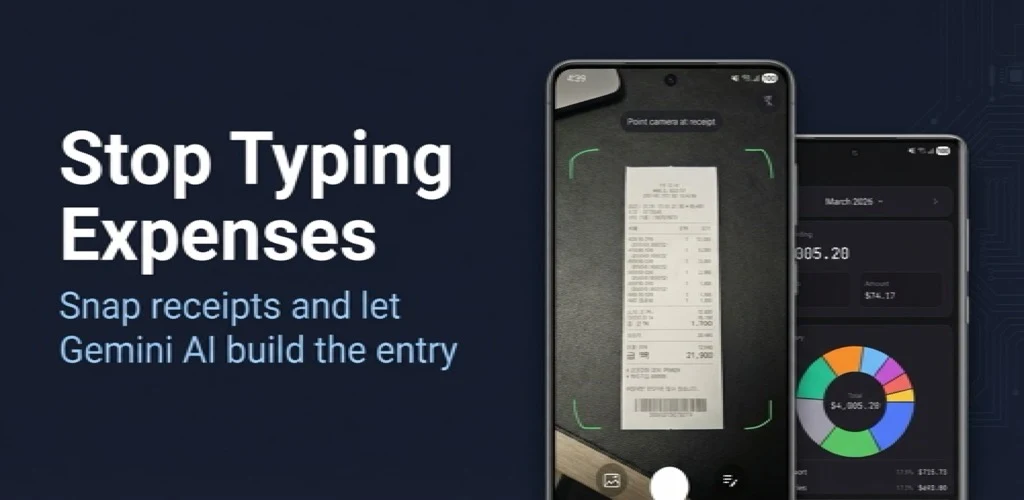
This is where AI-powered receipt scanning has genuinely changed the game. Instead of typing data manually, you take a photo and the AI extracts the key information automatically. The merchant name, amount, and date get pulled from the image, and all you have to do is confirm and categorize.
AI Receipt Scanning in Practice
I started using Receipt Snap about six months ago after yet another tax season disaster. The workflow is embarrassingly simple: I get a receipt, open the app, take a photo, and the AI fills in the merchant, amount, and date. I add a category tag like "office supplies" or "client meeting," hit save, and I'm done. The whole process takes maybe 15 seconds.
What surprised me most wasn't the scanning itself — it was how the habit stuck. Because it's so fast, I actually do it consistently. Previous systems failed because they required too much effort at the moment of capture. Pull out laptop, open spreadsheet, type merchant name, type amount, format date, pick category... by the third receipt of the day, you're already behind.
Receipt Snap works on Android, supports English, Korean, and Spanish, and lets you export your data by date range — which is exactly what my accountant needs. No monthly subscription drama, no enterprise features I'll never use. It does one thing and does it well.
Building the Complete System: Beyond Receipt Capture
Receipt scanning is the foundation, but a complete freelance expense system has a few more components.
Step 1: Separate Your Accounts
If you're still running business expenses through your personal checking account, fix this first. Open a dedicated business account — even a free one. When every transaction in that account is business-related by default, you eliminate the categorization guesswork for most expenses. This alone can save hours at tax time.
Step 2: Create Your Category List
Don't overthink this. Most freelancers need 8-12 categories at most:
- Office supplies and equipment
- Software and subscriptions
- Travel and transportation
- Meals and entertainment (client-related)
- Professional development
- Marketing and advertising
- Phone and internet (business portion)
- Home office expenses
- Contractor or subcontractor payments
- Bank and payment processing fees
Use the same categories consistently. Resist the urge to create hyper-specific categories like "Printer Ink — Color" vs. "Printer Ink — Black." Your accountant doesn't need that level of detail, and you won't maintain it.
Step 3: The Weekly 10-Minute Review
Even with daily receipt capture, set aside 10 minutes once a week — Sunday evening works for most people — to review what you've logged. Check that categories are correct, add notes to any expenses that might be ambiguous later ("Team lunch with contractor Sarah" is more useful than just "Restaurant"), and verify that nothing is missing by comparing against your bank statement.
This weekly habit catches errors early, before they become tax-season problems.
Step 4: Quarterly Export and Review
Every three months, export your expense data and review the totals by category. This serves two purposes: it helps you estimate quarterly tax payments (required for most freelancers in the US), and it reveals spending patterns you might want to adjust. If you discover you're spending $400/month on software subscriptions, maybe it's time to audit those tools.
Apps that support date-range exports make this straightforward. You select the quarter, export to CSV or PDF, and hand it to your accountant or drop it into your records.
Common Deductions Freelancers Miss
While we're talking about expenses, here are deductions that freelancers commonly overlook:
- Bank fees — Monthly account fees, wire transfer charges, and payment processing fees (PayPal, Stripe) are all deductible.
- Education — Online courses, workshops, books, and conference tickets related to your profession.
- Health insurance premiums — Self-employed individuals can deduct health insurance premiums in many countries.
- Retirement contributions — SEP IRA or solo 401(k) contributions reduce taxable income.
- Mileage — Driving to client meetings, the post office, or the office supply store counts. The 2026 IRS standard mileage rate is $0.70 per mile.
- Home office — Whether you use the simplified method ($5/sq ft, up to 300 sq ft) or the actual expense method, this is often worth hundreds of dollars.
- Phone bill — The business-use percentage of your phone plan is deductible. If you use your phone 60% for work, 60% of the bill is a write-off.
Choosing the Right Expense Tracking Tools
The expense tracking app market is crowded, and choosing the wrong tool is almost as bad as not tracking at all. Here's a framework for picking the right one:
Match the tool to your complexity level. A solo freelance writer doesn't need the same system as a freelance agency owner with five subcontractors. If you're a one-person operation, a focused receipt scanner plus a simple spreadsheet or your accountant's preferred software is plenty. Don't pay for features you won't use.
Prioritize capture speed. The best expense tracker is the one you'll actually use. If it takes more than 30 seconds to log a receipt, you'll stop using it within a month. Apps with AI scanning — where you snap a photo and the data is extracted automatically — have the highest long-term adherence rates because they minimize friction at the moment of capture.
Check export options. Your data is only useful if you can get it out. Make sure the app supports CSV or PDF exports filtered by date range. Your future self (or your accountant) will thank you.
Consider language support. If you work internationally or live in a non-English-speaking country, receipt scanning accuracy depends heavily on language support. An app trained only on English receipts will struggle with receipts from Korean convenience stores or Spanish pharmacies. Multi-language support isn't a nice-to-have — it's essential for accurate scanning.
The 15-Second Habit That Saves $2,400
Here's the bottom line. Freelance expense tracking doesn't need to be complicated. It doesn't require expensive software or an accounting degree. It requires one simple habit: capture every receipt at the point of purchase.
With AI receipt scanning, that habit takes about 15 seconds. Snap a photo. Confirm the extracted data. Save. Done.
Over the course of a year, those 15-second moments add up to a complete, organized expense record that makes tax season painless, ensures you claim every deduction you're entitled to, and gives you a clear picture of where your money actually goes.
The $2,400 that the average freelancer loses in missed deductions each year isn't a mystery. It's the result of small moments — receipts not captured, expenses not categorized, records not kept. Fix those small moments, and the savings take care of themselves.
Whether you use Receipt Snap, a spreadsheet, or sticky notes on your fridge, the system that works is the one you'll stick with. Start today with whatever tool feels effortless, and build the habit before you optimize the tool. Your next tax season will be the easiest one yet.